How do I Create or Manage Conversation Flow?
Last updated: July 31, 2026
Permissions: Administrator privileges are required. If you can create or edit Virtual Agents, you can create workflows.
Overview
A Workflow is the orchestration layer of your Virtual Agent (VA). It keeps the agent's responses predictable and holds the conversation to a defined sequence during a live interaction.
This guide explains what a Conversation Flow is and walks through its two core building blocks: Sub Agents and Transition Logic.
What is a Conversation Flow, and why do we need it?
A Conversation Flow defines the capabilities of a VA and the actions it can perform during a conversation. It allows you to break a long, complex set of instructions into modular, structured, and manageable steps, creating a clear conversation funnel for the VA to follow.
You can distinguish the flows into three categories:
Pre-call Flow — Executes before the conversation starts.
Conversation Flow — Manages the overall conversation sequence with the customer during live engagement.
Post-call Flow — Executes actions as soon as the conversation ends.
Info: This article focuses exclusively on the Conversation Flow. For assistance with other flows please refer to our Virtual Agent help articles.
Why is it needed?
Large Language Models (LLMs) performs well at executing the provided instructions. Where they fall short is sequence; when steps must happen in a specific order, an LLM may skip a step or hallucinate around the instructions rather than following them precisely. A missing step can be catastrophic during critical conversations.
For example, a customer contacting support about a payment must be authenticated beforehand the agent authorize a payment or blocks a card. A Conversation Flow lets you design the conversation as a logical sequence, guaranteeing that every critical step is completed in the predefined order.
Benefits from Conversation Flow
Build complex conversation flows with confidence.
Ensure all critical steps are followed in the predefined order.
Manage specific sections of a conversation independently, with modularity.
How does the Conversation Flow work?
Every Conversation Flow is built from two main components:
Conversation Node (also called a Sub Agent) — A modular unit of the flow that specializes in a specific skill or action, drawing on connected APIs, skills, or systems.
Transition Logic — The logic that tells an agent what to do next once the current node's task is complete.
Before you begin
If you want to utilize Actions within your Conversation Flow, verify that you have all required system apps and APIs configured on your Level Platform.
How to Create a New Conversation Flow
From the left-side navigation, click Virtual Agent.
Select an existing Virtual Agent, or create a new one to add a Workflow.
Scroll to the Workflow section and click Add a New Workflow.
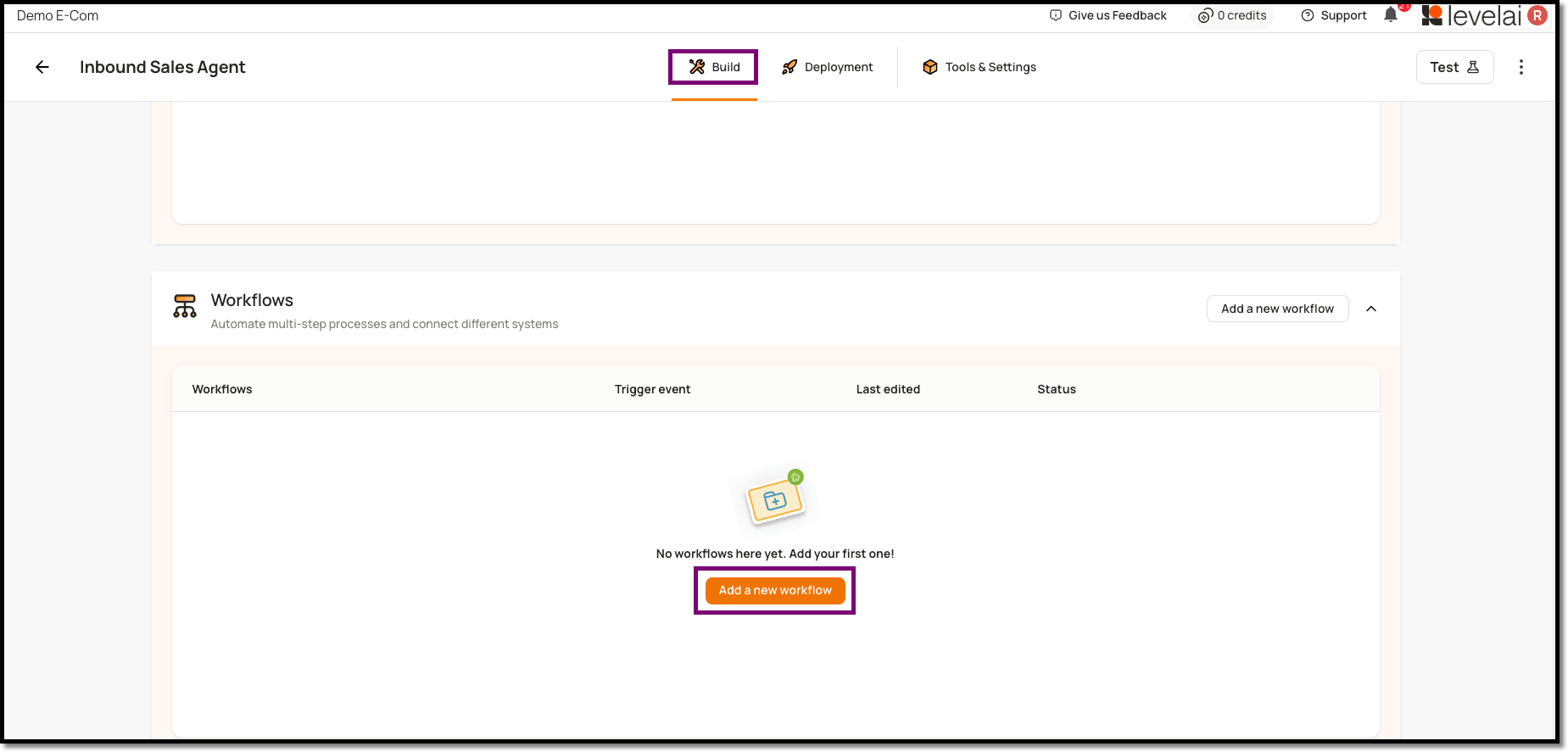
Enter a Workflow Name that indicates what the flow does.
(Optional) Add a Description for future reference.
Set the trigger to Conversation Start.
Select your preferred Channels — Website, Phone, or both.
Click Proceed to save. This opens the Flow Workspace.
How to Manage the Flow Workspace
To edit an existing flow, click into it from your workflow listing page.
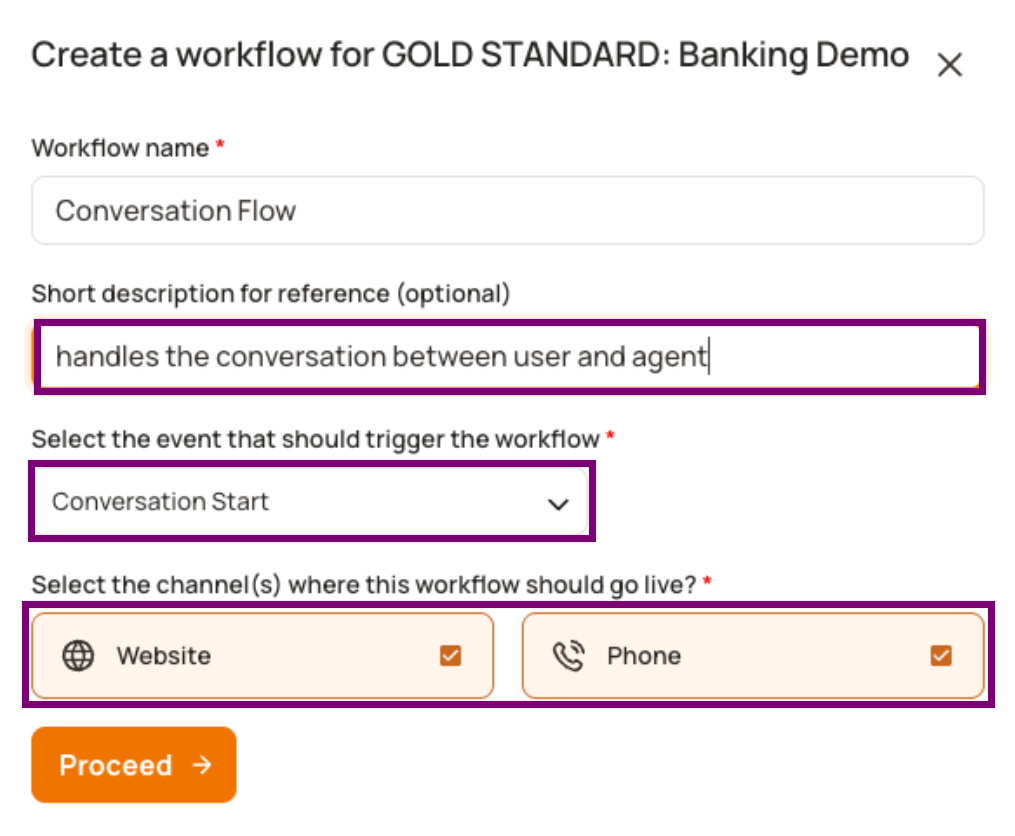
A new flow opens with a blank workspace containing only a Conversation Start node. From here, you build out the flow by creating and linking nodes.
Workspace Tools
Use the utility tools on screen to navigate complex flows:
Zoom In / Zoom Out — Focus on specific nodes or see the wider layout.
Fit to View — Automatically resize and center the entire flow on screen.
Enable or Disable a Flow
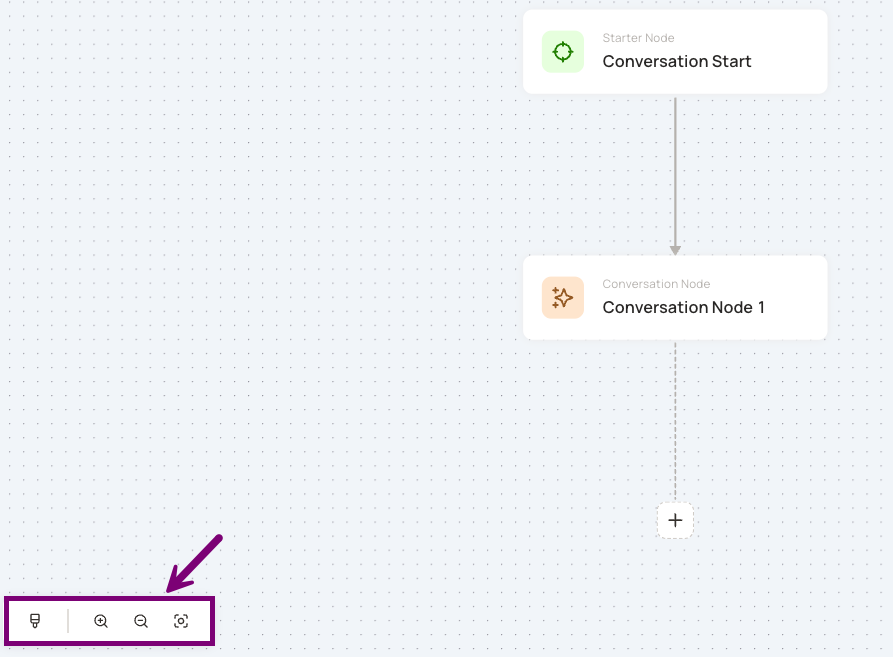
To trigger the flow when a conversation begins, turn on the Enable Workflow toggle. You can disable it at any time using the same toggle.
How to Build and Configure a Conversation Flow
Break your Flow into separate nodes, each responsible for a specific task. A common pattern:
Authentication Node — Verify the customer's identity (every customer passes through this first)
Intent-based Nodes — Route to specialized nodes based on what the customer needs:
Account Summary — balance, invoicing, amount due.
Make a Payment — guided transaction steps.
Change Due Date — update payment schedule.
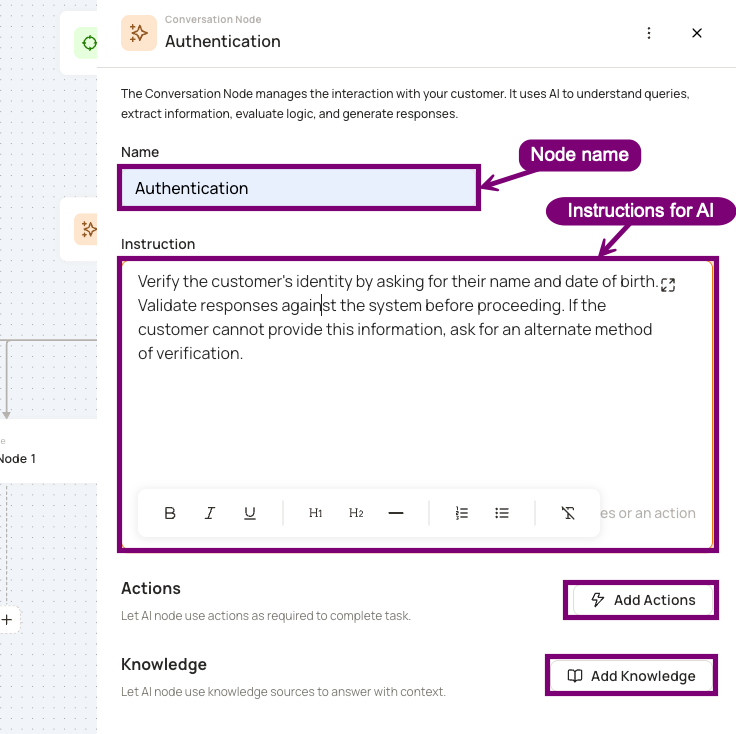
Configuring a Conversation Node
Since Conversation Nodes are the primary building blocks of a Conversation Flow, here's a quick overview of the three configuration areas.
Instructions - Write clear instructions for AI on how the agent should behave inside this node. Any data captured earlier in the flow (e.g., customer name from authentication) is stored in variables and available to reference directly in your instructions.
Actions (Optional) Attach actions that read from or write to external systems:
Pre-built Connectors — Select a platform (e.g., Salesforce) and pick from pre-configured actions.
APIs — Choose custom APIs connected to your Virtual Agent.
System Actions — Built-in behaviors like Call Transfer to hand off to a live agent.
Once added, invoke an action by referencing its name in your instructions — e.g., "Use the SQL query action tool to get the details."
See 📄 API & Integration Guide to learn how to connect APIs to your Virtual Agent.
Knowledge (Optional) Attach knowledge sources when the node needs to answer documentation-based questions. The agent only references knowledge attached to the node currently in execution.
How to Set Up Transition Logic
Transition Logic defines what happens after a node completes its task. Without it, the agent won't know which node to move to next.
How to Configure
Inside each Conversation Node, create a transition section within your instructions that specifies:
When the agent should transition (what condition triggers the move)
Where the agent should go (which node is the destination)
Example
In an Authentication node, your transition logic might state:
"If authentication is successful and the customer's query is about their current balance, transition to the Billing Queries node. If the customer wants to make a payment, transition to the Make a Payment node. If authentication fails after 3 attempts, transition to Call Transfer Node."
Key Considerations
Be explicit about timing. Specify whether a transition should happen immediately or only after a task is fully complete. For example, a call transfer can happen mid-authentication (if the customer requests it), but a payment transition should only happen after authentication succeeds.
Cover all paths. Account for every possible outcome — success, failure, and edge cases. If a transition path is missing, the agent may get stuck or behave unpredictably.
Keep transitions simple. Each node should have a clear, limited set of destinations. If a node has too many transition paths, consider splitting it into smaller nodes.